Showing posts with label Appmethod. Show all posts

Monday, February 29, 2016

DEB an Event Bus framework for Delphi

Hi all,
I have just started a new open source project: Delphi Event Bus a.k.a. DEB. As the title suggest DEB is an event bus framework based on publish/subscribe mechanism. It was inspired by EventBus framework for the Android platform.

How it works

DEB is designed to decouple different parts/layers of your application while still allowing them to communicate efficiently. The really exciting feature of this framework is that you can choose the delivery mode of the events: in the Main Thread or a Background thread.


Simply put the Subscribe attribute on your subscriber method you are able to receive a specific event, and by specifying the TThreadMode in attribute you can choose the context where to deliver the event.
For example, if you have to interact with the UI EventBus can deliver events in the main thread or If your subscriber does long running tasks (HTTP request), EventBus can also use background threads to avoid UI blocking. Regardless where an event was posted the EventBus will manage Thread synchronization, so you can deliver an Event in the MainThread and the subscriber will receive it on a background thread and viceversa.

Show me the code


Support

  • DEB is a 100% ObjectPascal framework so it works on VCL and Firemonkey
  • It works with DelphiXE7 and major
  • It should be works fine also on AppMethod

Currently, the project consists in a simple getting started guide, 2 great samples and a suite of unit tests. There is a lot of work to do, so any contributor is welcome. The project is hosted on github and here there is the link. I hope you are excited as much as I am about this project!

Stay tuned!

Monday, April 20, 2015

How-To use AdMob Interstitial Ads with Delphi XE7-XE8

Hi guys,
as you know by using the Delphi Android JNI you can access to Native features provided by Android SDK. The RAD Studio installation includes also Google Mobile ADS library (Androidapi.JNI.AdMob unit), as built-in java library for Android.
So by using this unit we can use the new Interstitials Ads provided by AdMob.
First of all rember to set to true the AdMob Service ( Project -> Entitlement List -> AdMob Service )


Let's start with the code.
Create an instance of TJInterstitialAd, wich is present in Androidapi.JNI.AdMob.
  
    FInterstitial := TJInterstitialAd.JavaClass.init(MainActivity);
    FInterstitial.setAdUnitId(StringToJString('Your-Publisher-ID'));

For example you can put the previous code in the FormCreate event. Then you have to use this code to display an Interstitial Ad (on button-click event in my demo):

var
  LADRequestBuilder: JAdRequest_Builder;
  LadRequest: JAdRequest;
begin
  LADRequestBuilder := TJAdRequest_Builder.Create;
  LADRequestBuilder.addTestDevice(MainActivity.getDeviceID);
  LadRequest := LADRequestBuilder.build();
  LAdViewListener := TMyAdViewListener.Create(FInterStitial);
  CallInUIThread(
    procedure
    begin
      FInterStitial.setAdListener(TJAdListenerAdapter.JavaClass.init
        (LAdViewListener));
      FInterStitial.loadAd(LadRequest);
    end);
end;

I used the TJAdRequest_Builder to create a request and set my device like a test device (see AdMob guidelines).
I also created a custom AdViewListener to intercept the interstitial events:
  • onAdClosed;
  • onAdFailedToLoad(errorCode: Integer);
  • onAdLeftApplication;
  • onAdOpened;
  • onAdLoaded;
TJAdListenerAdapter adapts my Listener class to Interstitial AdListener, this because I created a custom class to support interstitial events and show effectively the Ad when it was loaded.

TMyAdViewListener = class(TJavaLocal, JIAdListener)
  private
    FAD: JInterstitialAd;
  public
    constructor Create(AAD: JInterstitialAd);
    procedure onAdClosed; cdecl;
    procedure onAdFailedToLoad(errorCode: Integer); cdecl;
    procedure onAdLeftApplication; cdecl;
    procedure onAdOpened; cdecl;
    procedure onAdLoaded; cdecl;
  end;

procedure TMyAdViewListener.onAdLoaded;
begin
  FAD.show;
end;

Here the screenshot of interstitial on my phone:


This code should works also on AppMethod.
You can find the demo in my GitHub repository.

Friday, April 11, 2014

My First Appmethod App


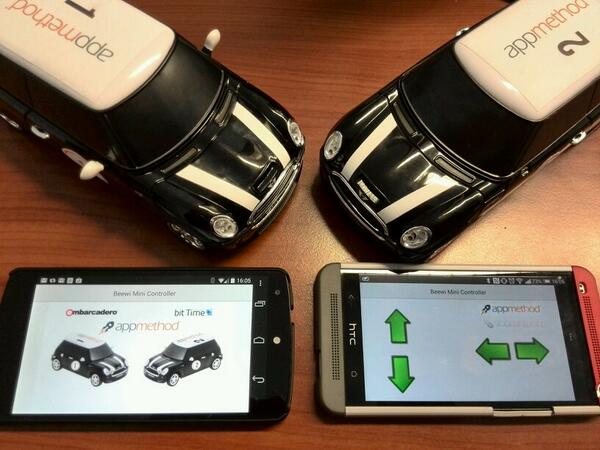
In the "bit Time Lab" me and my colleague Daniele Teti have developed an app to control a car via bluetooth with Appmethod, for Android and iOS (released soon) with the same codebase.

The main topics covered by the team are the multitouch UI and the bluetooth hardware interface using a true native app (no VMs, no scripting, no compromises). Below the picture of the app and the cars used.


Collegamento permanente dell'immagine integrata


The most interesting note was the time: we spent 7/8 hours to develop and build the entire system!
This project will be shown at the Rome Codemotion.
Here the video presentation of this project by bit Time Lab