Showing posts with label firebase. Show all posts

Tuesday, April 11, 2017

Delphi and Firebase: Remote configuration

Hi all,
as you know Firebase is a backend service that include a data storage service. One of common example of this kind of service is Remote Configuration, that allows you to change the behavior or appearance of your app (ex. change the welcome message of your app) without changing the app source code.
I've just updated the Firebase4Delphi repository with a new demo : RemoteConfigDemo.
In this demo I implemented a mechanism to allow to change the behavior and appearance of your app without publishing an app update.
The process is very simple, you have to:
  1. create a JSON Object in your console project that represents the app configuration
  2. Wraps that configuration in your app
  3. Check when configuration change and communicate it to your app
In this demo you have the possibilities to change the style of your application, according to OS, at run time.

Firebase Console 

AquaGraphite.style configured at run-time
RubyGraphite.style configured at run-time


ASAP I'll post a short video to show the power of this feature.
Saturday, June 18, 2016

Simple chat messaging system with Delphi and Firebase

Hi all,
some time ago I posted about my open source project: Firebase4Delphi. Well, Firebase was acquired by Google and in Google I/O 2016 was showed very interesting news and new features (more info here ). My project provide a REST facade to consume FIREBASE RealTime Database API.
The Firebase Realtime Database is a cloud-hosted database. Data is stored as JSON and synchronized in realtime to every connected client. When you build cross-platform apps with our iOS, Android, and JavaScript SDKs, all of your clients share one Realtime Database instance and automatically receive updates with the newest data. - Firebase Realtime Database Documentation
In my project there is a sample application about a Chat messaging system. If you enjoy Firebase program (https://console.firebase.google.com/), you are able to create your first Firebase project! See the online documentation to undestand how Firebase works.
Once you create your application you can start to use the Chat Messaging sample, it's very easy if you follow these steps:
  1. Create a clone of Firebase4Delphi project (or download it)
  2. Open Firebase4DelphiChatDemo.dproj
  3. Deploy the app on your favorite Target Platoform (Windows, Mac, Android, iOS)
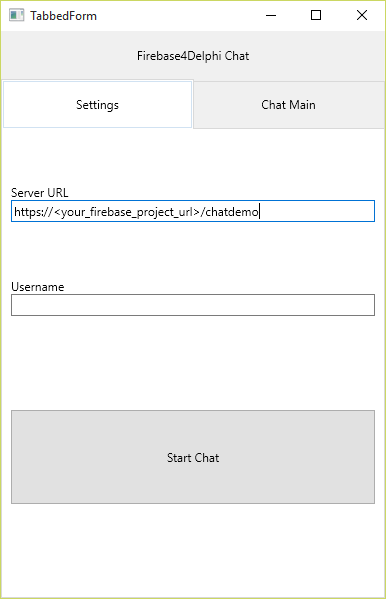
  4. Once application started, put in the settings tab (Fig 1) the URL provided by Firebase Realtime Database related to your project (Fig 2) , adding the demo name "chatdemo" as REST parameter
  5. Choose a username
  6. Click Start Chat button
Fig 1:

Fig 2:


Monday, June 1, 2015

Firebase4Delphi - A new open source project

Hi all,
I have just started a new open source project on github: Firebase4Delphi. For those that don't know Firebase, it's a backend service: including data storage, user authentication, static hosting, and more. Go here for more info https://www.firebase.com/ . The purpose of this project is provide a REST wrapper (facade) to consume FIREBASE REST API. For now there is a client for basically interact with REST API and a ChatDemo example based on the official demo (https://www.firebase.com/tutorial/#session/sf2ovtgq4ko). The project use System.Net library, so is compatible from DelphiXE8. Anyone wants to enjoy this project is welcome!