Friday, April 11, 2014

My First Appmethod App


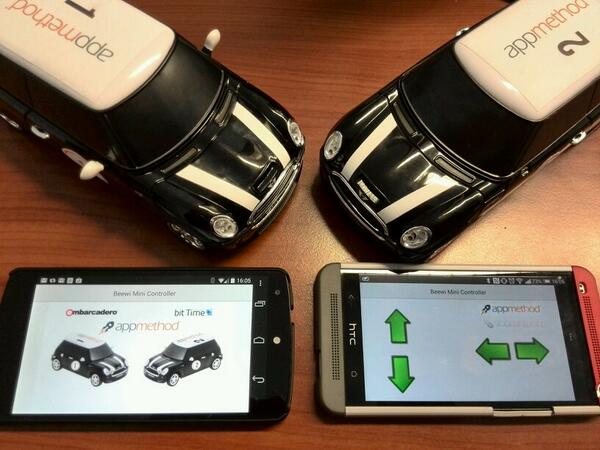
In the "bit Time Lab" me and my colleague Daniele Teti have developed an app to control a car via bluetooth with Appmethod, for Android and iOS (released soon) with the same codebase.

The main topics covered by the team are the multitouch UI and the bluetooth hardware interface using a true native app (no VMs, no scripting, no compromises). Below the picture of the app and the cars used.

Collegamento permanente dell'immagine integrata


The most interesting note was the time: we spent 7/8 hours to develop and build the entire system!
This project will be shown at the Rome Codemotion.
Here the video presentation of this project by bit Time Lab

Tuesday, March 11, 2014

Gideros Mobile - A game development tool

Gideros is a set of software packages created and managed by a company named  Gideros Mobile, it provides developers with the ability to create 2D games for multiple platforms by reusing the same code.

At italian DROIDCON in Turin, I held a speech about the Gideros Mobile framework (the slides will be available shortly).

We appreciate this tool so much that in bit Time Software we decided to make a game using Gideros: Math Brain. It's free and available for Android and iOS devices.


To start developing with Gideros I suggest the online tutorials and the book Gideros Mobile Game Development. Here you can find some considerations about the book written by me and my colleague Daniele Teti.

I hope to write soon new post about this tool.

Tuesday, January 29, 2013

How-To: Send Facebook App Request

Hi developer,
the problem in which I came across today was: how to link my Android app using Facebook SDK for Android?
The premise is that your Android app must appear in the App Center of Facebook and must be integrated with Facebook by the appropriate SDK.

The crucial point that is not mentioned by facebook tutorial is that the method to be called is "apprequests".

This is the code:
Bundle parameters = new Bundle();
params.putString("method", "apprequests");
WebDialog.RequestsDialogBuilder req = new WebDialog.RequestsDialogBuilder(this, mSession, parameters);
req.setMessage("Your message that compare in the request");
req.setTitle("The title of the web dialog");
req.build().show();

Also not specifying your friends (like the example code above) user will see a Multi Friend Selector and will be able to select a maximum of 50 recipients.